


Case study / Analytics / CRM integration
Shanti Island: Connecting Marketing, Website Analytics and the Customer Journey
Shanti Island is a yoga and meditation academy offering online programmes and developing its training offering in Bali.
A prospective student’s journey can take several visits: meeting the teachers today, signing up for a free course tomorrow, asking a question on WhatsApp and returning to make a purchase later.
We made that journey easier for the team to understand. Our work brought together detailed website analytics, conversion tracking for Google and Meta, and a custom CRM duplicate-control service. The system preserves the context of actions and enquiries, giving marketing and sales a more complete picture.
Understand what interested a prospective student
Suppose a course page attracts plenty of visitors but few enquiries. Where should the team look first? Do people reach the programme, find answers to their questions or start the form and abandon it?
We structured GA4 and Google Tag Manager tracking across four levels: page → section → element → specific content. We prepared consistent website markup and naming rules, so each event carries context: where an action happened and which course, teacher, module or resource it relates to.
GA4 has 17 custom dimensions for this analysis. For example, section_name identifies the page section, content_id identifies a specific piece of content, and interaction_type describes the action. The same structure works across different pages, making their data easier to compare.
The team can see which sections visitors reach, which modules and FAQ answers they open, and how far they watch videos — including 25%, 50%, 75% and completion milestones, plus whether the sound is on. Form-field interactions and successful submissions are tracked separately.
This can be useful when improving a landing page: find where the journey breaks down, then test a specific change — moving the programme higher up the page or simplifying the registration form, for example.
Move from report numbers to real user behaviour
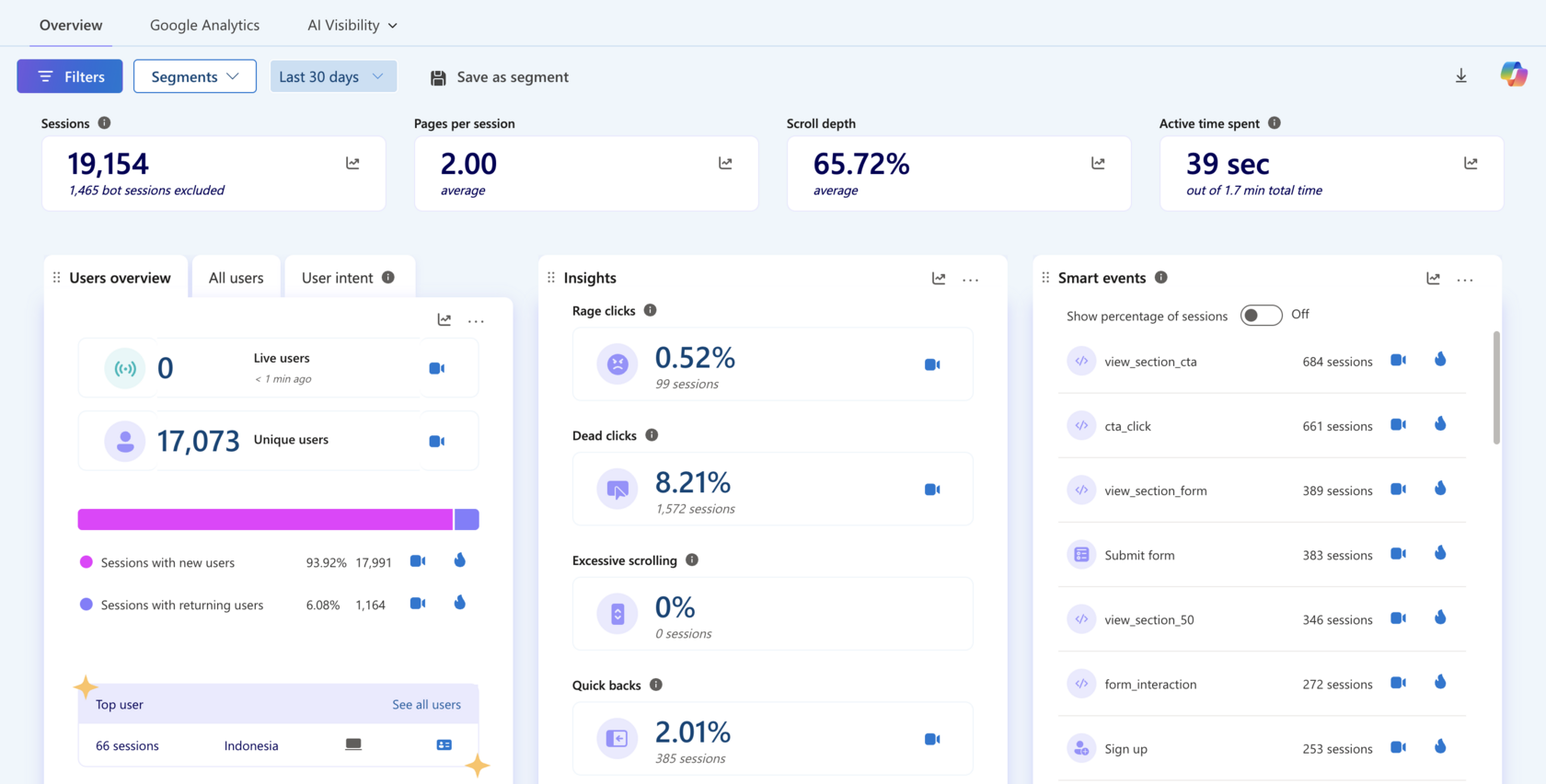
To help the team understand the reasons behind those numbers, we complemented GA4 with Microsoft Clarity. Selected key events and their context are sent to Clarity: the course programme, offer, form, video or call-to-action.
For example, the team can find sessions where visitors began interacting with a form but did not submit it, then watch what happened next. Was there an error? Did the mobile keyboard cover the button? Did the visitor return to the course description?
This can be useful when marketers and designers work together. GA4 helps them locate a step with drop-offs; Clarity lets them examine real situations and decide what to change. We also prepared a guide to the events and filters so the team can use the setup independently.
Report purchases to Google and Meta, even after the tab closes
A student creates an order, opens the payment provider and pays for their training. Payment confirmation can arrive later — sometimes after they have closed the website. Browser-only tracking can miss that purchase.
We added working server-side integrations with Meta Conversions API and Google Ads alongside browser tracking. WooCommerce supplies the order data: order creation triggers checkout events, and confirmed payment triggers purchase events. The actual amount and currency are included. For a deposit, the event records the deposit amount.
Traffic sources, UTM tags and advertising identifiers are saved with the order. When payment is confirmed later, the integration uses those stored details rather than trying to read cookies from a browser that is no longer open.
We also built in protection against double counting. Meta’s browser and server events use a shared event_id for deduplication. Repeated notifications about the same order should not turn into additional purchases.
This can be useful for businesses using external payment providers or delayed payment confirmation: advertising platforms receive more complete purchase signals, and the team has a more reliable basis for evaluating acquisition.
Recognise one customer across a form, Instagram and WhatsApp
A customer submits a website form, writes on Instagram and continues the conversation on WhatsApp. To them, it is one conversation. In the CRM, several contacts and deals may appear, leaving the sales team to work out how they connect.
We developed a separate server-side service that receives website and CRM events, checks email and phone matches, and selects the primary contact and deal. Subsequent forms and orders are routed to the primary record. Duplicates are flagged and linked to it, with the checks recorded in an audit log and a dedicated admin interface.
An important scenario is contact information arriving later. Someone may start an Instagram conversation without sharing an email. When a team member adds their email or phone number, the contact update triggers another check, allowing the service to connect it to an earlier enquiry.
This can be useful for teams receiving enquiries through several channels. It becomes easier to find a customer’s history and distinguish a returning contact from a new prospective student.
Keep data organised through repeated notifications and outages
The integration keeps a history of forms, orders and payment statuses. It uses event_id and order_id to avoid processing the same notification twice or creating multiple records of one order.
If the CRM is temporarily unavailable, events can be retried. The admin interface shows processing status and attempt counts, with an option to restart an event when needed. Payment status is stored for each order, and paid amounts are converted to USD for consistent comparison.
This helps with everyday operations: the team can check which data reached the CRM and which events need attention, rather than discovering a problem only when a customer gets in touch.
What the Shanti Island team gained
The system gives the team a connected view of the full customer journey — from the first touchpoint, through website engagement and enquiries, to an order and confirmed purchase. Source data, behavioural events and CRM history bring context to each stage, including repeat visits and conversations across channels.
Consistent collection rules help organise data from different traffic sources. The team can analyse marketing activities, compare the quality of audiences brought in by different channels and campaigns, explore engagement with programmes, and find drop-offs between a visit, an enquiry and a purchase.
That creates a basis for decisions grounded in numbers: which activities to develop, where to adjust an offer, which pages to improve and which steps of the funnel to examine first. Detailed analytics, confirmed conversion data and duplicate control help marketing and sales work from a shared picture of the customer journey.